
White Label
Automate High-Risk Onboarding: Streamline Risky Processes
Learn the best practices to automate high-risk onboarding, reduce security risks, and ensure a smooth, compliant onboarding experience.


White-label payment infrastructure for acquiring banks

White-label payment gateway for low-risk PSPs

Built for high-risk PSPs — full control over your channels
Learn the best practices to automate high-risk onboarding, reduce security risks, and ensure a smooth, compliant onboarding experience.
Route transactions, configure antifraud logic and control 3DS from one rules engine built into your payment processing flow. Apply different rules across your PSP, merchants and shops.
Routing is only one part of the processing logic. Smart Routing can determine where a transaction goes, how it is assessed and whether it requires 3DS.
Its rules can use current transaction data, merchant context, payment history and processing conditions.
One rules layer. Multiple processing decisions.
Start with a simple routing condition or combine transaction data, merchant context, risk signals and payment history into more specific processing logic.
The rule can be simple. The processing logic does not have to be.
Smart Routing brings transaction assessment and antifraud rules into the same processing logic used for routing and authentication.
Define the conditions that trigger an antifraud rule and the action to take when those conditions are met.
SmartCheck history can also be used as a condition, bringing previous chargebacks and failed transactions into the decision.
Different merchants and shops can have different acquiring relationships, risk requirements and processing conditions. Configure Smart Routing logic at PSP, merchant or individual shop level.
Keep one processing infrastructure without forcing every merchant to follow the same rules.
Not every processing decision should depend only on the current payment. Smart Routing can use historical payment behaviour and accumulated processing data as part of its rules.
Bring SmartCheck signals such as chargeback and failed-transaction history into Smart Routing conditions.
Create rules around accumulated processing volumes and trigger notifications at defined thresholds.
Use weights to control how eligible transactions are distributed between available processing connections.
A new merchant. A different routing condition. A new antifraud rule. A change in 3DS logic or processing limits.
Update the processing logic centrally in Smart Routing instead of hard-coding it into individual merchant integrations.
Explore Smart Routing documentation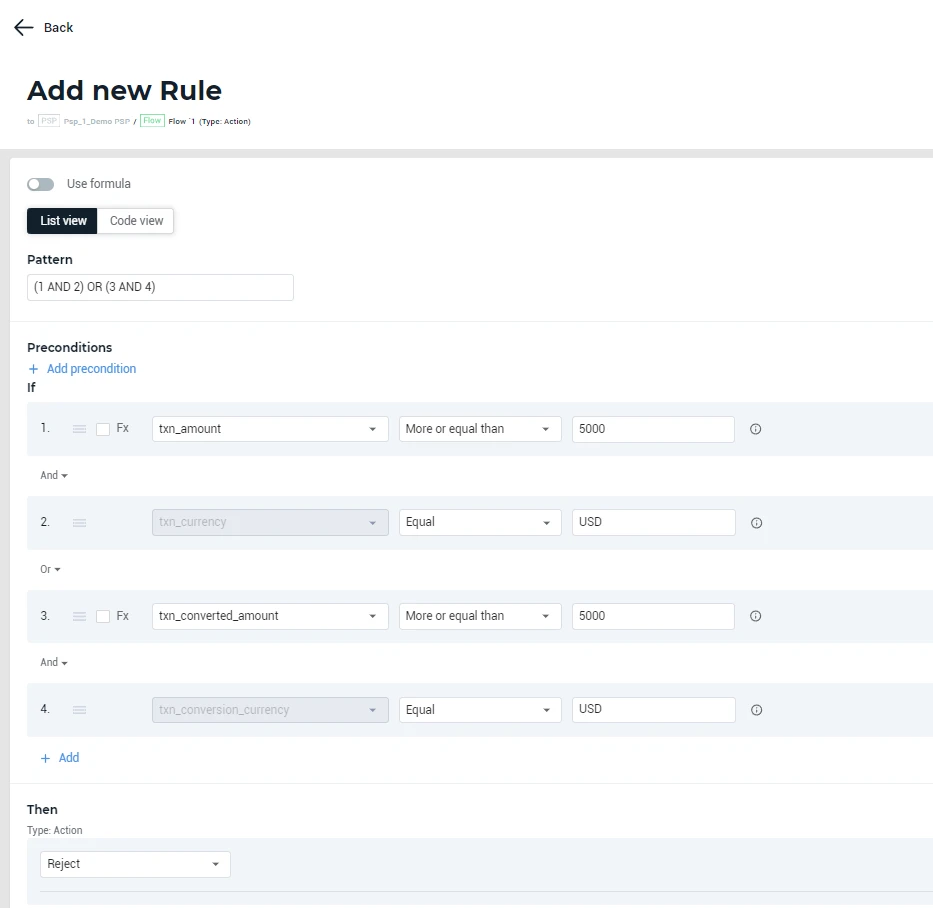
Explore additional Smart Routing controls and processing scenarios for more specific requirements.
Your merchants, acquiring relationships, risk policies and processing constraints are specific to your business. Your processing logic should be too.
Bring us your routing, antifraud or processing challenge. We will show you how it can be handled with Smart Routing.
Request a demo